
UOU Result 2026: Check Marks, Grade Card and Scrutiny Status
UOU announced scrutiny results for June 2026 term-end exams on 03 November 2026. UOU results portal supports Regular, Back Paper, and Improvement Paper results. Results are available for JULY-2025 and JANUARY-2026 sessions on the main portal. Students need Enrollment Number and Date of Birth to check UOU results. Provisional degrees and marksheets can be downloaded from the UOU website.
Jump to
- UOU Alerts & Notifications
- UOU Result: Scrutiny Examination Results (June 2026 Session)
- UOU Result: Important Highlights for Current Sessions
- UOU Result: How to Check Term-End Examination Results?
- UOU Result: Details on Your Grade Card and Marks
- UOU Result: Checking Back Paper and Improvement Paper Results
- UOU Result: Main Examination Results (Previous Sessions)
- UOU Result: Back Examination Results (Previous Sessions)
- UOU Result: Applying for Scrutiny of Marks
- UOU Result: Downloading Provisional Degree and Marksheet
- UOU Result: B.Ed. Entrance Exam Results (2026)
- UOU Result: official portals and documents
- Questions about UOU Result
Uttarakhand Open University (UOU), also known as Uttarakhand Mukt Vishwavidyalaya, publishes term-end examination results for various programmes on its official results portal. Students can access their grade cards and marks for regular, back paper, and improvement paper examinations. The portal has been updated to include results for the JULY-2025 and JANUARY-2026 sessions. Checking results requires an enrollment number and date of birth.
At a glance
- Latest Scrutiny Result Date
- 03 November 2026 (June 2026 session)
- Main Results Portal
- results.uou.ac.in
- Available Sessions (Current Portal)
- JULY-2025, JANUARY-2026
- Exam Types Available
- Regular, Back Paper, Improvement Paper
- Required Details to Check Result
- Enrollment Number, Date of Birth
- Scrutiny Application Portal
- online.uou.ac.in/SE_Scrutiny.aspx
UOU Result: Scrutiny Examination Results (June 2026 Session)
Uttarakhand Open University (UOU) announced the scrutiny examination results for the June 2026 term-end exams on 03 November 2026. Students who applied for scrutiny can now check their updated results. The university has published this notice for all affected candidates.
This announcement provides the outcome for students who requested a re-evaluation of their answer scripts. Candidates should refer to the official university announcements for specific instructions on accessing these results.
UOU Result: Important Highlights for Current Sessions
The UOU results portal has been updated to include specific examination types and sessions for students. This update allows candidates to check their performance for recent term-end examinations. The portal is accessible online for convenience.
Key Details for Checking UOU Term-End Examination Results
| Attribute | Detail |
|---|---|
| Official Results Portal | results.uou.ac.in |
| Available Exam Types | Regular, Back Paper, Improvement Paper |
| Available Sessions | JULY-2025, JANUARY-2026 |
| Required Information | Enrollment Number, Date of Birth |
UOU Result: How to Check Term-End Examination Results?
Students can check their Uttarakhand Open University (UOU) term-end examination results through the dedicated student information system. The process involves selecting the examination type and session, then providing personal details. This ensures secure access to individual grade cards.
- Visit the UOU Current Results portal.
- Select the ‘Exam Type’ from the dropdown menu (options: Regular, Back Paper, Improvement Paper).
- Choose the ‘Session’ from the dropdown menu (options: JULY-2025, JANUARY-2026).
- Select your ‘Programme’ from the respective dropdown list.
- Choose your ‘Year/Semester’ from the dropdown menu.
- Enter your ‘Enrollment’ number in the designated field.
- Provide your ‘Date of Birth’ in the specified format.
- Click the ‘Get Result’ button to view your grade card and marks.
- Use the ‘Download’ button to save your result for future reference.
Other UOU services students check
UOU Result: Details on Your Grade Card and Marks
The UOU grade card or marksheet provides a comprehensive overview of a student’s performance in the term-end examinations. It includes essential personal information and detailed subject-wise marks. Students should carefully review all details for accuracy.
- Student’s Name
- Enrollment Number
- Programme Name
- Year/Semester
- Exam Type (Regular, Back Paper, Improvement Paper)
- Session
- Subject Codes and Names
- Marks Obtained in each Subject
- Total Marks
- Result Status (Pass/Fail)
- Date of Result Publication
UOU Result: Checking Back Paper and Improvement Paper Results
Uttarakhand Open University (UOU) allows students to check results for both back paper and improvement paper examinations through the same online portal. This integrated system simplifies the process for candidates appearing in these special categories. Students must select the correct exam type during the search.
- Navigate to the UOU Current Results portal.
- From the ‘Exam Type’ dropdown, select ‘Back Paper’ or ‘Improvement Paper’ as applicable.
- Choose the relevant ‘Session’ (JULY-2025 or JANUARY-2026).
- Fill in your ‘Programme’, ‘Year/Semester’, ‘Enrollment’ number, and ‘Date of Birth’.
- Click ‘Get Result’ to view your specific back paper or improvement paper results.
UOU Result: Main Examination Results (Previous Sessions)
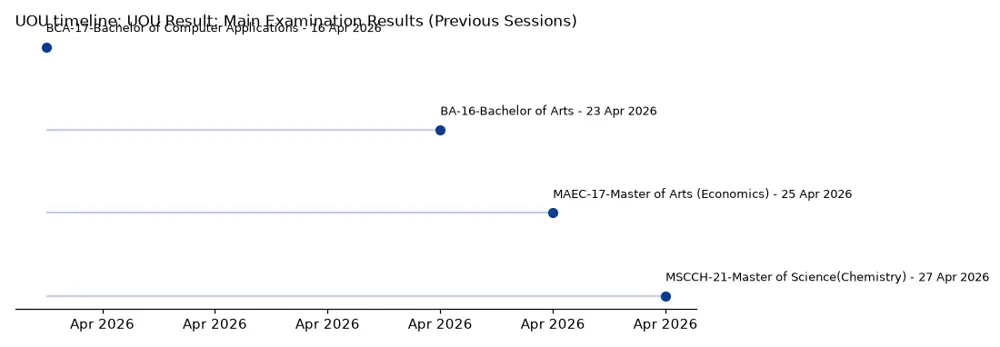
For main examination results from sessions older than those listed on the current results portal, Uttarakhand Open University provides a separate archive. Students can access these historical results by selecting the specific session from a dropdown menu. This ensures access to past academic records.
The archive page displays results by programme, year/semester, and their respective publish dates. Students should locate their specific programme and year to find their result status.
- Go to the UOU Main Examination Results page.
- Select the desired ‘Session’ from the dropdown menu. Options include July-2025, July-2020, January-2020, 2019-20-Summer, 2019-19 Winter, 2018-19 Summer, 2018-18 Winter, 2017-18 Summer, 2016-17 Winter, and 2016-17 Summer.
- The page will display a table of published results for that session. Locate your ‘Programme’ and ‘Year/Semester’ to find the ‘Publish Date’ of your result.
Sample of Recent Main Examination Results Published by UOU
| Programme | Year/Semester | Publish Date |
|---|---|---|
| BA-16-Bachelor of Arts | 3-Year | 23 Apr 2026 |
| MAEC-17-Master of Arts (Economics) | 2-Year | 25 Apr 2026 |
| BCA-17-Bachelor of Computer Applications | 6-Semester | 16 Apr 2026 |
| MSCCH-21-Master of Science(Chemistry) | 4-Semester | 27 Apr 2026 |
UOU Result: Back Examination Results (Previous Sessions)
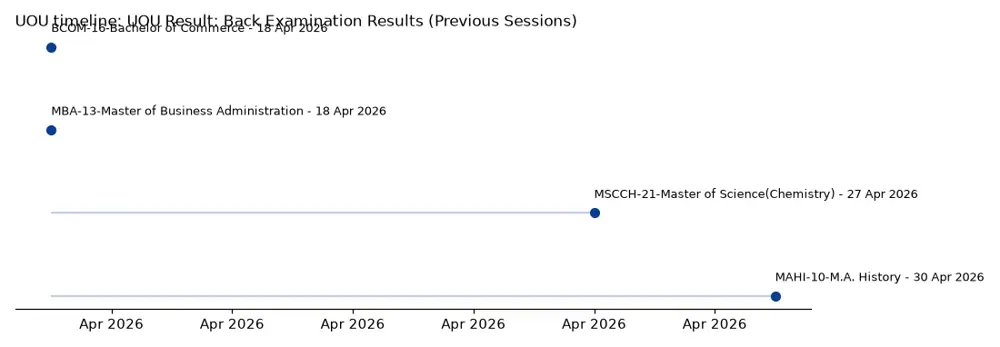
Uttarakhand Open University also maintains an archive for back examination results from various past sessions. Students needing to check older back paper results can use a dedicated portal. This portal lists results by programme, year/semester, and publication date.
Similar to main results, students must select the correct session to view the relevant back examination results. The full list of published results is available on the dedicated page.
- Visit the UOU Back Examination Results page.
- Select the desired ‘Session’ from the dropdown menu. Options include July-2025, July-2020, January-2020, 2019-20-Summer, 2019-19 Winter, 2018-19 Summer, 2018-18 Winter, 2017-18 Summer, 2016-17 Winter, and 2016-17 Summer.
- The page will display a table of published back results for that session. Find your ‘Programme’ and ‘Year/Semester’ to see the ‘Publish Date’ of your result.
Sample of Recent Back Examination Results Published by UOU
| Programme | Year/Semester | Publish Date |
|---|---|---|
| MAHI-10-M.A. History | 1-Year | 30 Apr 2026 |
| MBA-13-Master of Business Administration | 4-Semester | 18 Apr 2026 |
| BCOM-16-Bachelor of Commerce | 3-Year | 18 Apr 2026 |
| MSCCH-21-Master of Science(Chemistry) | 4-Semester | 27 Apr 2026 |
UOU Result: Applying for Scrutiny of Marks
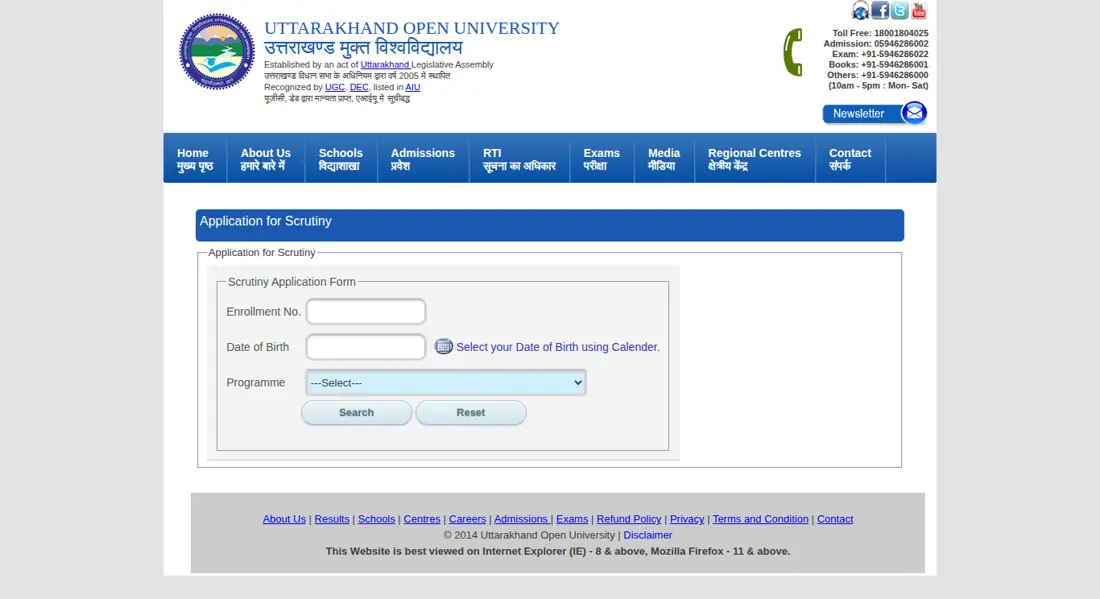
Students who are dissatisfied with their Uttarakhand Open University (UOU) examination marks can apply for scrutiny. This process allows for a re-evaluation of answer scripts to ensure fair assessment. Applications are submitted through a specific online form, requiring enrollment and programme details.
- ACCT-11-ADVANCED CERTIFICATE COURSE IN INDUSTRIAL TRAINING
- ADCA-10-Advance Diploma in Computer Applications
- BA-10-Bachelor of Arts
- BBA-10-Bachelor of Business Administration
- BCA-10-Bachelor of Computer Applications
- BCOM-10-Bachelor of Commerce
- BED-17-Bachelor of Education (B.Ed.)
- BLIS-21-Bachelor of Library and Information Science
- BSC-12-Bachelor of Science
- BTS-10-Bachelor in Tourism Studies
- Access the UOU Scrutiny Application Form.
- Enter your ‘Enrollment No.’ in the designated field.
- Select your ‘Date of Birth’ using the calendar tool.
- Choose your ‘Programme’ from the extensive dropdown list.
- Proceed with the application as instructed on the form.
UOU Result: Downloading Provisional Degree and Marksheet
After successful completion of their programmes, Uttarakhand Open University (UOU) students can apply for and download their provisional degree and marksheet online. This service is crucial for further education or employment purposes. The university provides dedicated links for these essential documents.
- Students can apply for their degree online via the UOU Important Links section.
- Provisional Degree/NOC applications are also available through the UOU Important Links section.
- The UOU Important Links section provides a link to download Provisional Degree / NOC.
- Students can download their transcript or marksheet from the UOU Transcript/Marksheet download page.
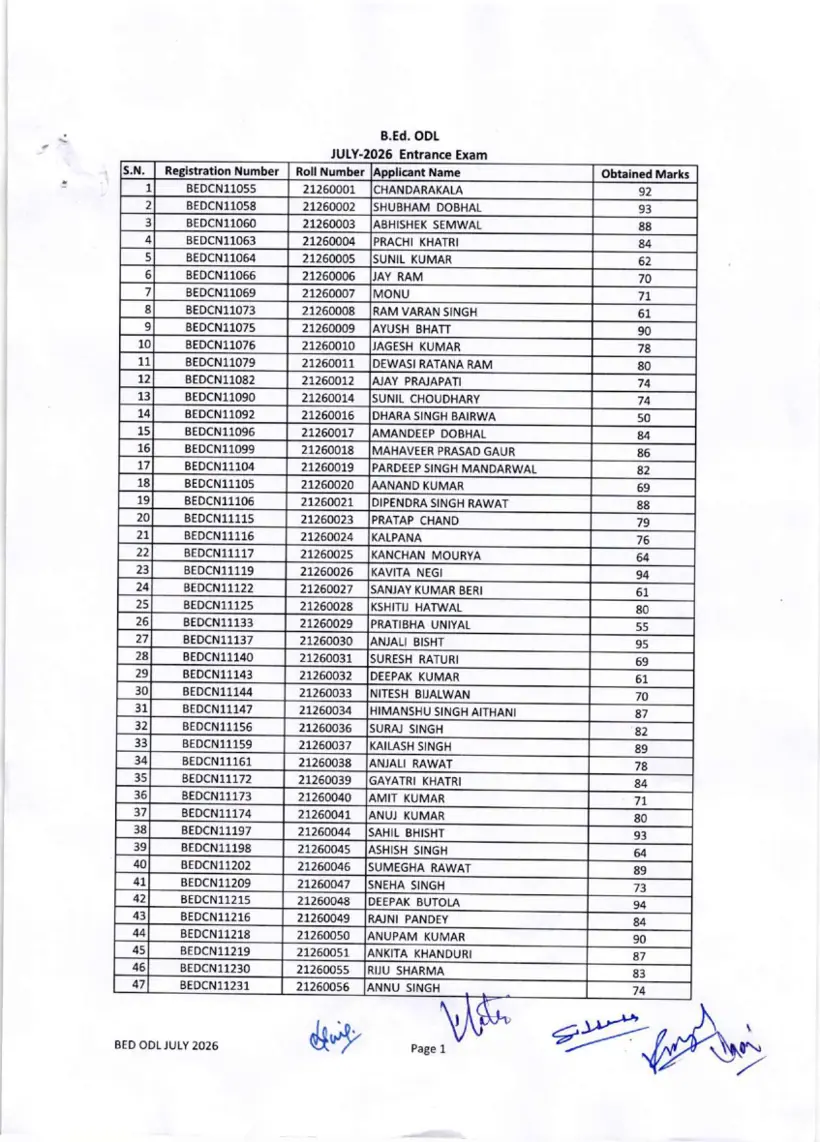
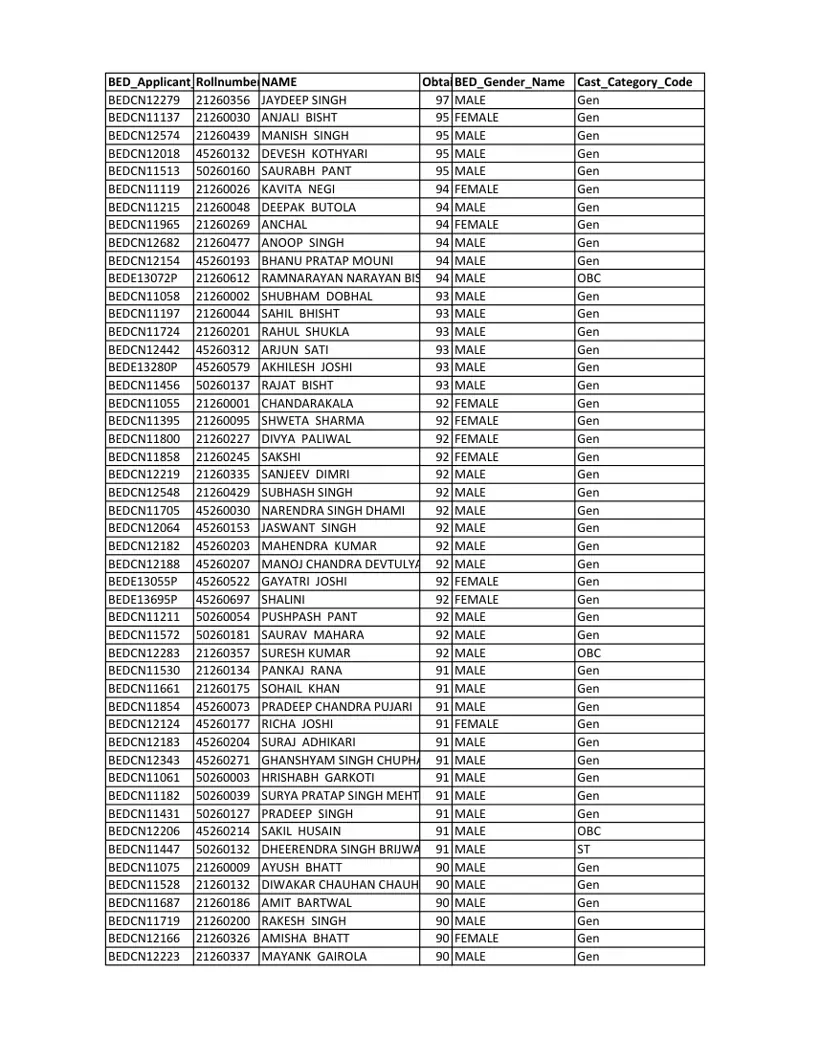
UOU Result: B.Ed. Entrance Exam Results (2026)
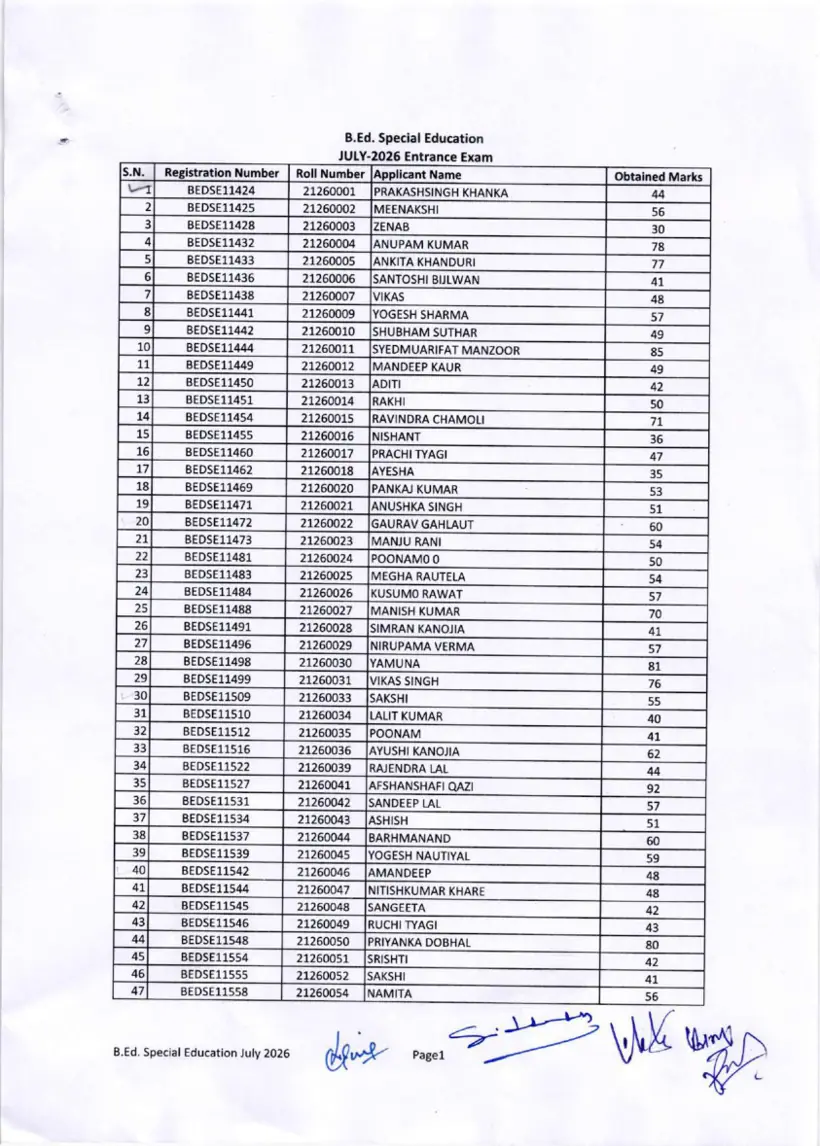
Uttarakhand Open University (UOU) has published the entrance examination results for the B.Ed. (ODL) and B.Ed. (Special) programmes for the year 2026. Candidates who appeared for these entrance tests can check their results through the official PDF documents. The results list successful candidates by their enrollment numbers.
- Download the B.Ed (ODL) Entrance 2026 Result PDF.
- Download the B.Ed (Special) Entrance 2026 Result PDF.
- Search for your enrollment number within the respective document to check your status.
Questions about UOU Result
How can I check if I have passed a subject exam at Uttarakhand Open University (UOU)?
Students view their subject pass status directly on the UOU Current Results portal at results.uou.ac.in. The online grade card displays subject-wise marks and pass or fail status for regular, back paper, and improvement paper exams across the JULY-2025 and JANUARY-2026 sessions. Candidates must select their exam type, session, programme, and semester, then enter their enrollment number and date of birth. If the search fails, learners should re-check their details or visit the archived results section.
Which sessions are available for checking results on the UOU portal?
The main UOU results portal currently provides exam results for the JULY-2025 and JANUARY-2026 academic sessions. This facility applies to students taking regular, back paper, or improvement paper examinations online. To view older records, learners must visit the UOU Main Examination Results page and select archived sessions such as July-2020 or January-2020 from the session dropdown menu. If a required session does not appear on the active portal, candidates should search the dedicated main examination archive.
Can I download my UOU marksheet online?
Students can download their marksheet and transcript online through the dedicated UOU Transcript/Marksheet download page. This online provision applies to candidates who have completed term-end examinations across recognised diploma, degree, or certificate programmes. Learners must navigate to the portal, enter their required credentials, or use the Download button on the grade card screen. If online downloads fail to generate, candidates can access provisional degrees and NOCs under the Important Links section.
How do I check UOU back paper results?
Students check UOU back paper results by accessing the UOU Current Results portal at results.uou.ac.in. This process applies to candidates re-appearing in failed or missed subjects for active sessions including JULY-2025 and JANUARY-2026. You must choose Back Paper from the Exam Type dropdown, select your session, programme, and year or semester, then input your enrollment number and date of birth. If older back paper results are missing, candidates should visit the UOU Back Examination Results page.
What details are required to check UOU results?
Checking UOU results requires a student’s enrollment number, date of birth, exam type, session, programme, and year or semester. These details apply to all learners accessing regular, back paper, or improvement exam records on the UOU Current Results portal. Candidates must visit results.uou.ac.in, select options from the dropdown menus, enter their enrollment and calendar date of birth, and click Get Result. If an error occurs, click Reset and re-enter your official enrollment details correctly.
What is the latest update regarding UOU results?
As of 03 November 2026, Uttarakhand Open University (UOU) has announced the scrutiny examination results for the June 2026 term-end exams. Students who applied for scrutiny can now check their updated status through official university announcements.
How can students check the UOU B.Ed entrance examination result 2026?
Uttarakhand Open University publishes the B.Ed (ODL) and B.Ed (Special Education) entrance examination results for 2026 as official downloadable PDF documents. This provision applies to candidates who appeared for the July 2026 entrance tests for teacher education programmes. Applicants must open the respective entrance result PDF link on the university website and search for their roll number or enrollment number within the list. If your number is missing, verify your exam registration details with the admissions office.
How can learners access their complete academic history using UOU Student One View?
Students can access their full academic record by opening the Student One View section on the official UOU website. This service applies to all registered distance learners seeking consolidated previous year results and enrolment details in one place. Users navigate to the Student One View portal under Our Services, enter their enrollment credentials, and submit the search request. If student details fail to populate, contact UOU student support at 05946-286000 for database verification.
When were the UOU BA 3rd Year main examination results published for the 2026 session?
Uttarakhand Open University published the BA 3rd Year main examination results for the BA-16, BA-17, and BA-21 programme codes on 23 April 2026. This announcement applies to undergraduate Bachelor of Arts students enrolled in final-year annual examinations. Students check their published status by visiting the UOU Main Examination Results page and selecting July-2025 or relevant session options. If your marksheet displays incomplete entries, contact your assigned regional study centre for resolution.
What additional charges apply when making online fee payments on UOU portals?
Uttarakhand Open University levies an additional 2% charge on online payments made via credit card, debit card, or net banking. This fee condition applies to all candidate fee transactions, including examination, scrutiny, and admission payments processed online. Candidates are redirected to the Student Information Review Page to verify their details before confirming payment on the secure gateway. If a payment succeeds but the website fails to redirect, candidates should download their receipt using the portal retry options.
UOU Result: official portals and documents
- UOU Current Results portalresults.uou.ac.in ↗
- UOU Scrutiny Application Formonline.uou.ac.in ↗
- UOU Main Examination Results pageuou.ac.in ↗
- UOU Back Examination Results pageuou.ac.in ↗
- UOU Transcript/Marksheet download pageresults.uou.ac.in ↗
- UOU Student Corneruou.ac.in ↗
- UOU B.Ed ODL Entrance Exam Result July 2026 PDF — B.Ed (ODL) Entrance 2026 Result PDF
- UOU B.Ed Special Education Entrance Exam Result July 2026 PDF — B.Ed (Special) Entrance 2026 Result PDF