
UOU Updates Results Portal for JULY-2025 and JANUARY-2026 Sessions
Uttarakhand Open University (UOU) has updated its official results portal, enabling students to now check their Regular, Back Paper, and Improvement Paper results for the JULY-2025 and JANUARY-2026 examination sessions. This enhancement provides a consolidated platform for students to access their academic performance across various examination categories.
Jump to
- UOU Alerts & Notifications
- UOU Results Portal Now Live for JULY-2025, JANUARY-2026 Sessions
- How to Check Your UOU Examination Results
- Understanding Exam Types: Regular, Back Paper, and Improvement
- Sessions Covered: JULY-2025 and JANUARY-2026
- Post-Result Actions: Scrutiny and Transcripts
- Other UOU Result Information
- This UOU notice: official portals and documents
- Questions about this UOU notice
At a glance
- Updated Portal
- UOU Results Portal
- Available Exam Types
- Regular, Back Paper, Improvement Paper
- Covered Sessions
- JULY-2025, JANUARY-2026
- Information Required
- Exam Type, Session, Programme, Year/Semester, Enrollment Number, Date of Birth
- Access Link
- UOU Results Portal
UOU Results Portal Now Live for JULY-2025, JANUARY-2026 Sessions
Uttarakhand Open University has officially rolled out an update to its dedicated results portal, streamlining the process for students to access their examination outcomes. This significant enhancement introduces new functionalities, allowing students to check their performance for recent academic sessions.
The updated portal now specifically caters to results for the JULY-2025 and JANUARY-2026 examination sessions. Students can seamlessly navigate the platform to retrieve their scores for Regular, Back Paper, and Improvement Paper examinations, all from a single, integrated interface.
How to Check Your UOU Examination Results
Students seeking to view their results for the specified sessions must follow a straightforward procedure on the UOU results portal. The system is designed for easy navigation, requiring specific details to ensure accurate result retrieval.
- Visit the official UOU Results Portal at results.uou.ac.in ↗.
- Select the appropriate ‘Exam Type’ from the dropdown menu, choosing between ‘Regular’, ‘Back Paper’, or ‘Improvement Paper’.
- Choose your ‘Session’ from the available options: ‘JULY-2025’ or ‘JANUARY-2026’.
- Select your ‘Prog’ (Programme) and ‘Year Sem’ (Year/Semester) from their respective dropdown lists.
- Enter your ‘enrollment’ number in the designated field.
- Provide your ‘Dob’ (Date of Birth) in the specified format.
- Click the ‘Get Result’ button to display your examination outcome.
- Optionally, click the ‘Download’ button to save a copy of your result, or ‘Reset’ to clear the form.
Understanding Exam Types: Regular, Back Paper, and Improvement
The updated results form on the UOU portal now clearly distinguishes between three primary examination types for students. These categories are ‘Regular’, ‘Back Paper’, and ‘Improvement Paper’, providing comprehensive access to various result scenarios.
Students who appeared for their scheduled examinations will select ‘Regular’ to view their performance. Those who re-appeared for previously failed subjects can choose ‘Back Paper’, while students aiming to enhance their scores in specific subjects will find their results under ‘Improvement Paper’.
Other UOU services students check
Sessions Covered: JULY-2025 and JANUARY-2026
The current update to the UOU results portal specifically makes results available for two key examination cycles: JULY-2025 and JANUARY-2026. This ensures that students from these recent sessions can promptly access their academic records.
The inclusion of these specific sessions on the updated form highlights UOU’s commitment to providing timely and organised access to examination results for its diverse student body.
Post-Result Actions: Scrutiny and Transcripts
After checking their results, students have options for further academic processes, such as applying for scrutiny or requesting transcripts. Uttarakhand Open University provides dedicated portals for these services to ensure student support.
Students who wish to have their answer scripts re-evaluated can apply for scrutiny through the Scrutiny Application Form portal. Additionally, for official academic records, students can request their transcripts via the Download Transcript/MarkSheet section, which lists sessions up to JUNE-2026 and DEC-2026 for transcript requests.
Other UOU Result Information
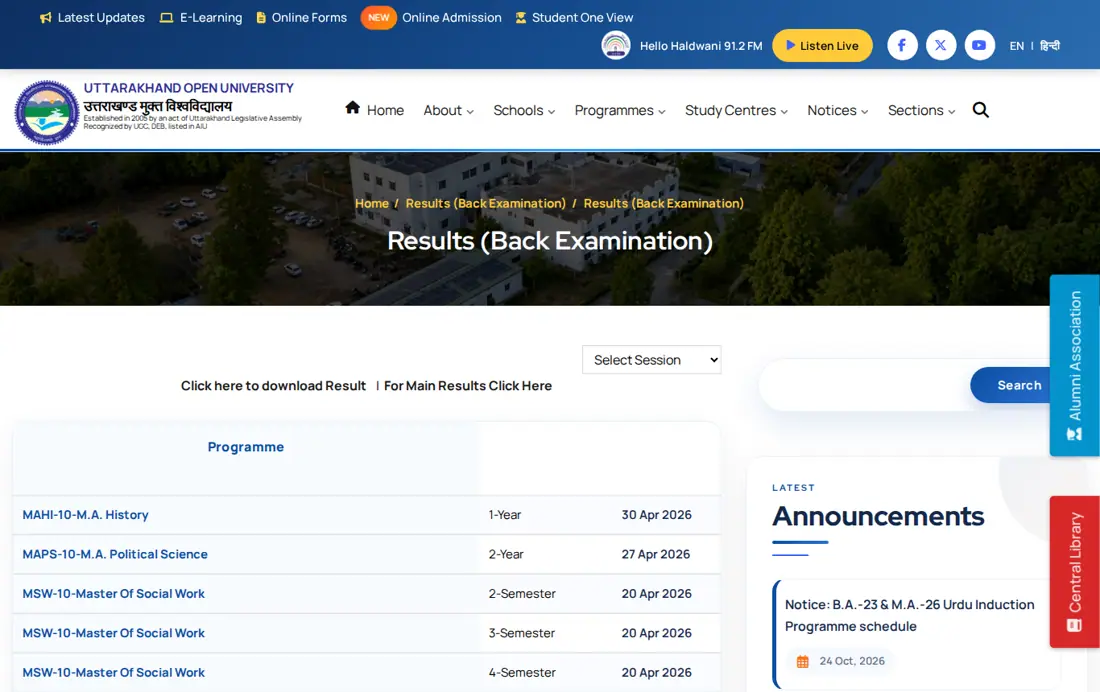
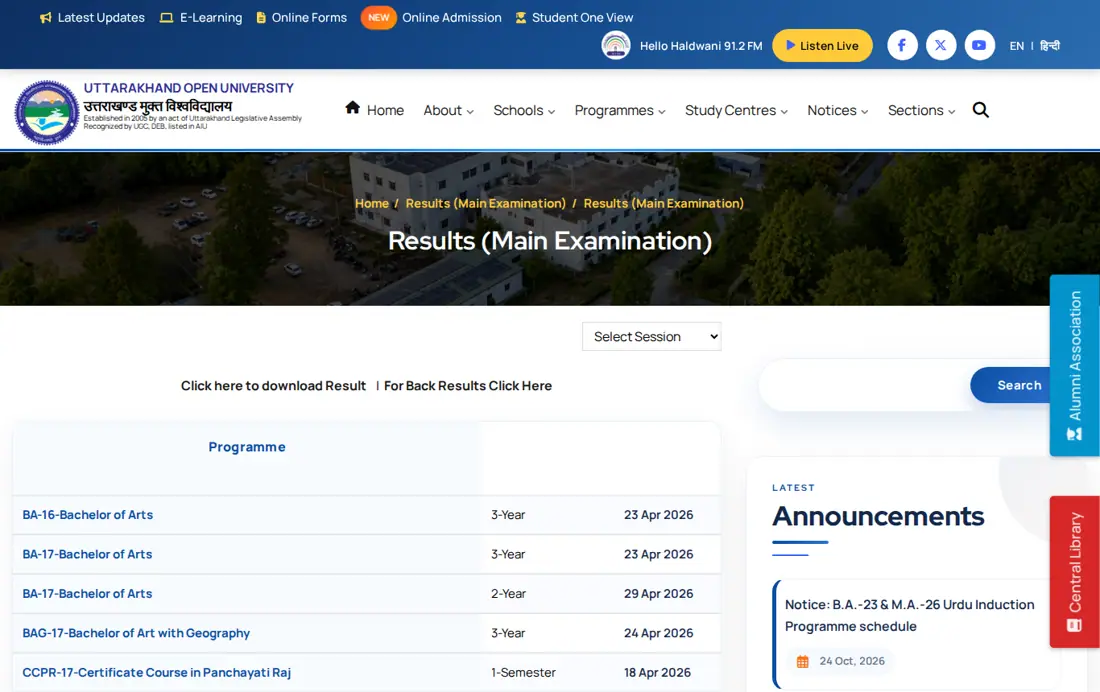
Beyond the newly updated portal for specific sessions, Uttarakhand Open University regularly publishes various examination results on its official website. This includes results for main examinations and back examinations across numerous programmes and semesters.
For instance, main examination results for programmes like BA, BCom, BCA, and various MA and MSc courses from different years/semesters were published in April 2026, as seen on the Results (Main Examination) page. Similarly, back examination results for a wide array of courses, including MBA and B.Ed. Special Education, were also released around the same period on the Results (Back Examination) page.
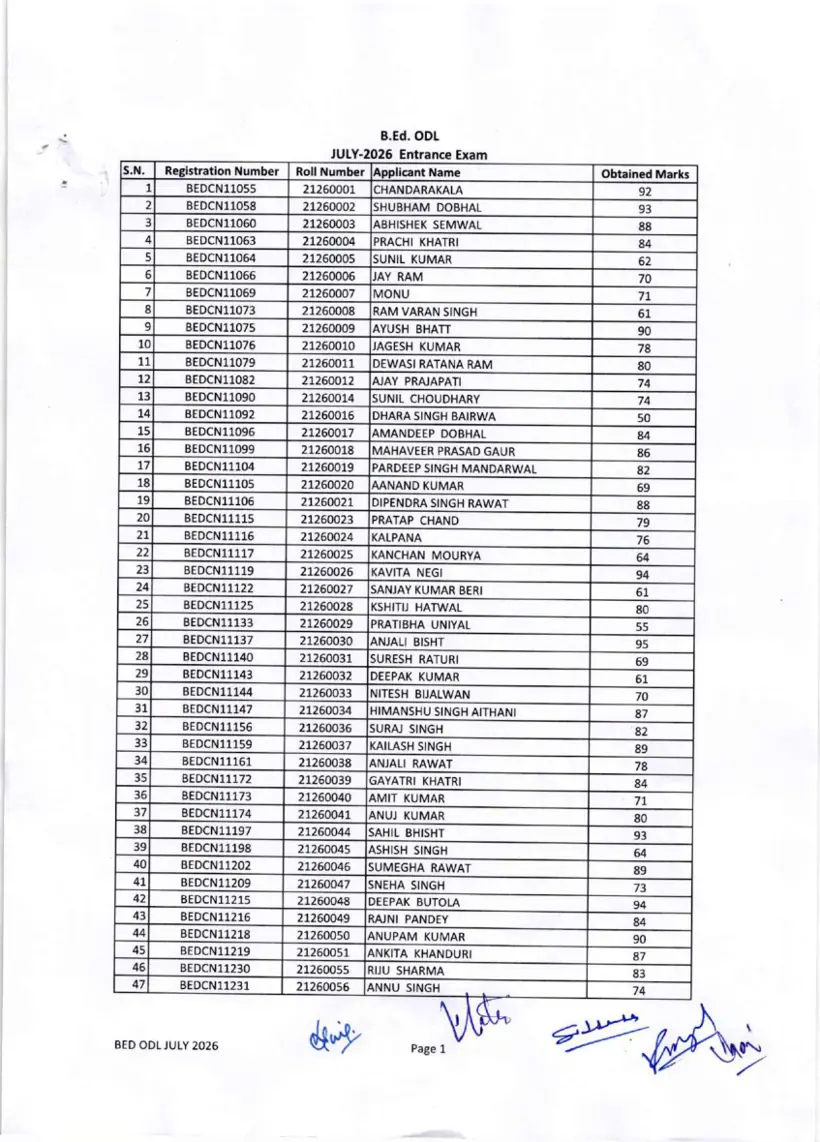
UOU also publishes entrance examination results, such as the B.Ed (ODL) Entrance 2026 results, which are made available as separate documents on the university website.
Questions about this UOU notice
Which examination sessions are covered by the updated results portal?
The updated Uttarakhand Open University results portal covers the JULY-2025 and JANUARY-2026 examination sessions. Students checking outcomes for these specific cycles can view their marks across Regular, Back Paper, and Improvement categories. To retrieve your statement, open results.uou.ac.in, select your session and programme, enter your enrollment number with date of birth, and click Get Result. If the query fails to fetch your score, click the Reset button to clear all fields and try submitting again.
What types of examination results can I check on the new portal?
Students can check Regular, Back Paper, and Improvement Paper examination results on the updated Uttarakhand Open University portal. This functionality applies to enrolled candidates checking their academic performance for the JULY-2025 and JANUARY-2026 examination sessions. To access your score, visit results.uou.ac.in, choose your exam type, session, programme, and year or semester, enter your enrollment number and date of birth, then click Get Result. If the query fails to display your mark statement, click the Reset button to clear all fields before trying again.
What information do I need to access my results?
To access your results on the UOU portal, you must provide your Exam Type, Session, Programme, Year/Semester, Enrollment Number, and Date of Birth. This applies to all students checking Regular, Back Paper, or Improvement marks for JULY-2025 and JANUARY-2026 sessions. Go to results.uou.ac.in, pick your course, fill in your enrollment number, pick your birth date, and tap Get Result. If retrieval fails, click Reset to clear inputs before trying again.
Can I download my result from the portal?
Yes, Uttarakhand Open University provides an explicit Download button on the results portal to save a copy of your mark statement. Once your Regular, Back Paper, or Improvement results for JULY-2025 or JANUARY-2026 appear on screen, this button enables saving your digital scorecard. Navigate to results.uou.ac.in, fill out your programme, enrollment number, and date of birth, then click Get Result to generate your report. If the download fails, click Reset and resubmit your query.
Where can I find information about applying for scrutiny or transcripts?
Uttarakhand Open University provides online forms for scrutiny applications and transcript requests through dedicated university portals. Students seeking re-evaluation of their answer scripts can apply on online.uou.ac.in/SE_Scrutiny.aspx by entering their enrollment number, date of birth, and programme. For official transcripts covering sessions through JUNE-2026 and DEC-2026, students should visit results.uou.ac.in/TransScriptResults.aspx to submit their request. If submission fails, re-verify your selected programme code and enrollment details before trying again.
When were the main examination results for BA and BCom published by UOU in 2026?
Uttarakhand Open University published main examination results for several undergraduate courses, including BA and BCom, in April 2026. Specifically, BA 3-Year results were published on 23 April 2026, BA 2-Year results on 29 April 2026, BCom 3-Year results on 07 April 2026, and BCom 2-Year results on 12 April 2026. Students can view these published lists on the main examination results section at uou.ac.in/results-main. If a specific result link does not open, re-check the publication list under your corresponding programme code.
How can candidates check the UOU B.Ed ODL Entrance Examination 2026 results?
Uttarakhand Open University releases entrance examination outcomes, including the B.Ed (ODL) Entrance 2026 results, as downloadable PDF documents on its official portal. Candidates can check their qualifying status by locating their roll number and name in the published PDF list on uou.ac.in. The entrance result list includes candidate roll numbers such as 21260011 and 21260118 alongside candidate names like POOJA KUMARI. If your roll number is not visible, verify that you downloaded the complete document for the 2026 entrance test.
Where can students check back examination results published by Uttarakhand Open University?
Uttarakhand Open University publishes back examination results for re-appearing candidates on its dedicated page at uou.ac.in/results-back. For example, back results for programmes like MBA 4-Semester and MA English 2-Year were released on 18 April 2026 and 22 April 2026 respectively. To check your status, navigate to the back examination results page, locate your programme code with the year or semester, and click the published date entry. If the result page fails to load, verify your programme code from your admit card.
How does Uttarakhand Open University handle and secure personal student data collected online?
Uttarakhand Open University collects personal details such as student names, email addresses, and contact information strictly to enroll students in various educational programmes. The university protects this information by implementing SSL Certificates alongside physical, electronic, and managerial security procedures to prevent unauthorized access or disclosure on its website. Students can review updates to these data safeguards on the official privacy policy section. If you experience security issues while accessing university portals, report them directly to university administrators.
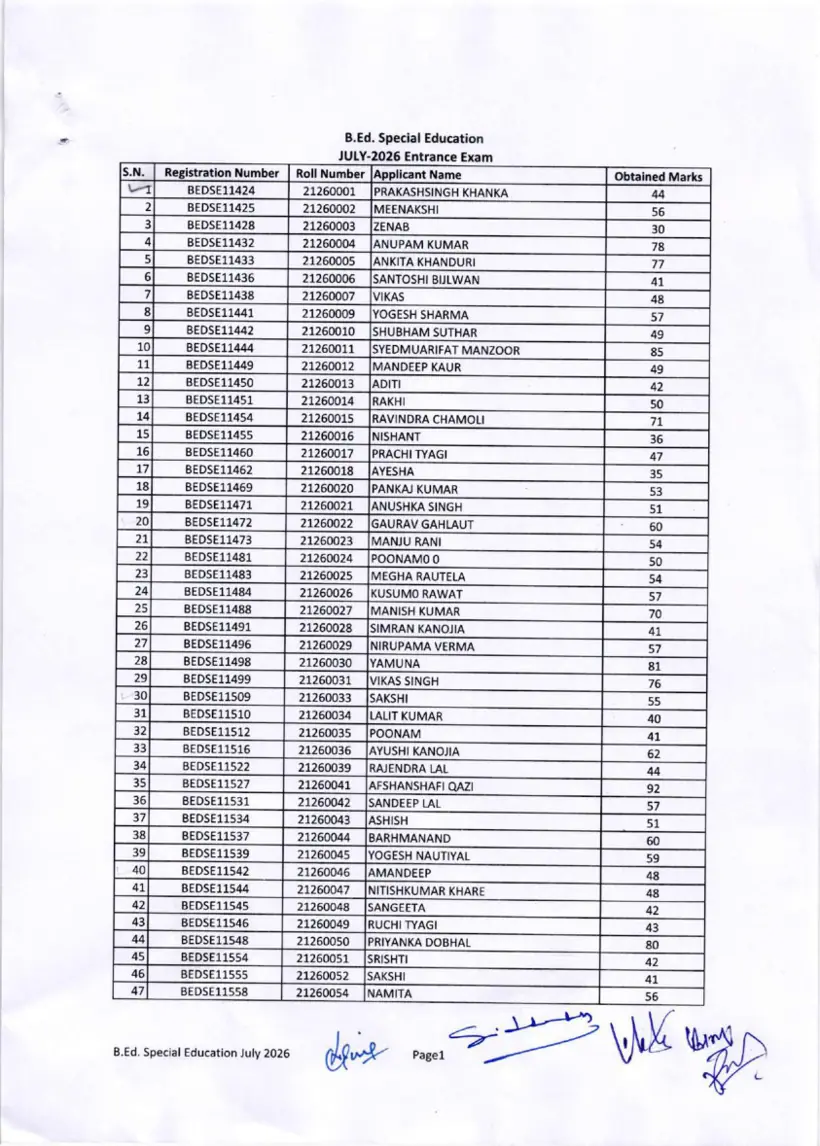
How can candidates view the UOU B.Ed Special Education Entrance Exam 2026 results?
Uttarakhand Open University publishes the B.Ed Special Education July 2026 entrance exam results as downloadable PDF lists on its portal. Candidates can check their status by searching for their roll number and candidate name in the official document on uou.ac.in. The published list includes roll numbers such as 27260709 and 21260232 alongside names like PANKAJ KUMAR and ANUSHKA SINGH. If your roll number is not visible, ensure you downloaded the complete document for the July 2026 entrance cycle.
Which examination sessions are listed for requesting transcripts on the UOU transcript portal?
Uttarakhand Open University allows transcript requests for academic sessions from 2018-19-Summer up to JUNE-2026 on its transcript portal. Students requiring an official transcript can submit their request online at results.uou.ac.in/TransScriptResults.aspx. On the portal, select your examination session, choose your programme code, and enter your enrollment details to generate the request. If the submission fails, re-verify your selected programme code against your student records before trying again.
What details are required to submit an online scrutiny application for UOU examination results?
Uttarakhand Open University requires students to submit their Enrollment Number, Date of Birth, and Programme code when applying for result scrutiny online. This re-evaluation option is accessible via the official portal at online.uou.ac.in/SE_Scrutiny.aspx for enrolled candidates. To fill the form, select your birth date from the calendar, pick your programme code like BA-23 or BCOM-23, enter your enrollment number, and submit. If you encounter issues during submission, contact the university examination helpline at +91-5946286022 for support.
This UOU notice: official portals and documents
- UOU Results Portalresults.uou.ac.in ↗
- Apply for Scrutinyonline.uou.ac.in ↗
- Main Examination Resultsuou.ac.in ↗
- Back Examination Resultsuou.ac.in ↗
- Download Transcript/MarkSheetresults.uou.ac.in ↗
- UOU B.Ed ODL Entrance Exam Result July 2026 PDF — B.Ed (ODL) Entrance 2026 Result
More on News & Updates
- UOU July 2026 Academic Session Online Admission Deadline Extended to Oct 13
- UOU Re-registration Deadline Extended for July 2026 Session: Complete Process by October 15
- UOU Yoga Programmes: Mandatory 10-Day Counselling Session & Workshop Announced for Oct 27-Nov 5
- UOU Holds Induction for July 2026 Session New Entrants at Dakpathar
- UOU Dec 2026 Session: Online Back, Improvement and City Change Applications Open
- UOU December 2026 Term-End Exams to Follow Bloom's Taxonomy; Sample Papers Released