
UOU Revaluation & Results: Scrutiny, Main, Back, and B.Ed Entrance (June/July 2026)
Part of UOU Results & Grade Card: UOU Result 2026: Check Marks, Grade Card and Scrutiny Status
UOU scrutiny applications are open for the June 2026 examination. Students must use their Enrollment Number and Date of Birth for scrutiny applications. Main and back paper results are available on the UOU results portal. B.Ed (ODL) and B.Ed (Special) Entrance Exam 2026 results were published in September 2026. Transcripts and marksheets can be downloaded for sessions up to June 2026.
Jump to
- UOU Scrutiny Application: June 2026 Exam Notice
- UOU Scrutiny and Revaluation
- UOU Scrutiny Application: Important Highlights
- How to Apply for UOU Scrutiny?
- Details Required for UOU Scrutiny Application
- UOU Main Examination Results: Latest Sessions
- How to Check UOU Main Examination Results?
- UOU Back Paper Examination Results: Latest Sessions
- How to Check UOU Back Paper Examination Results?
- UOU Transcript/Marksheet Download: June 2026 Session
- How to Download UOU Transcript/Marksheet?
- UOU B.Ed Entrance Exam Results 2026
- What to do if UOU Result or Scrutiny Application Problem?
- UOU Revaluation & Results: Next Steps
- UOU Revaluation & Results: official portals and documents
- Questions about UOU Revaluation & Results
Uttarakhand Open University (UOU), also known as Uttarakhand Mukt Vishwavidyalaya, provides distance learners with options to review their examination performance. Students can apply for scrutiny of their answer scripts for the June 2026 examination. Additionally, UOU publishes results for main examinations, back papers, and entrance exams, with transcripts and marksheets available for download for various sessions up to June 2026.
UOU Scrutiny Application: June 2026 Exam Notice
Uttarakhand Open University (UOU) has opened the application process for scrutiny of answer scripts for the June 2026 examination. This allows students to request a re-evaluation of their exam papers if they are not satisfied with their results.
Students enrolled in various programmes can access the dedicated online portal to submit their scrutiny applications. The application requires specific student details to process the request for the June 2026 examination.
At a glance
- Scrutiny Application Session
- June 2026 Exam
- Scrutiny Application Portal
- online.uou.ac.in/SE_Scrutiny.aspx
- Main/Back Exam Results Portal
- results.uou.ac.in
- Transcript/Marksheet Portal
- results.uou.ac.in/TransScriptResults.aspx
- B.Ed Entrance Results Publication
- September 2026
UOU Scrutiny and Revaluation
UOU Scrutiny is a process where students can apply to have their answer scripts re-checked for potential errors in marking or totaling. This option is available for distance learners who wish to ensure accuracy in their awarded marks.
The university provides an online facility for this purpose, streamlining the application process for students. It is an important mechanism for addressing concerns regarding examination outcomes.
UOU Scrutiny Application: Important Highlights
The application for scrutiny for the June 2026 examination is currently available through the UOU online portal. Students should ensure they have their enrollment number and date of birth ready before proceeding.
As of 27 November 2026, UOU has not published specific fees or last dates for the scrutiny application on its website. Students should complete the application process promptly once their results are declared.
Key Details for UOU Scrutiny Application
| Detail | Value |
|---|---|
| Applicable Session | June 2026 Exam |
| Application Portal | UOU Scrutiny Application Form |
Other UOU services students check
How to Apply for UOU Scrutiny?
Students can apply for UOU scrutiny by following a straightforward online procedure on the dedicated portal. This process ensures that all necessary information is captured for the re-evaluation request.
It is crucial to accurately enter all required details to avoid any delays in processing the scrutiny application.
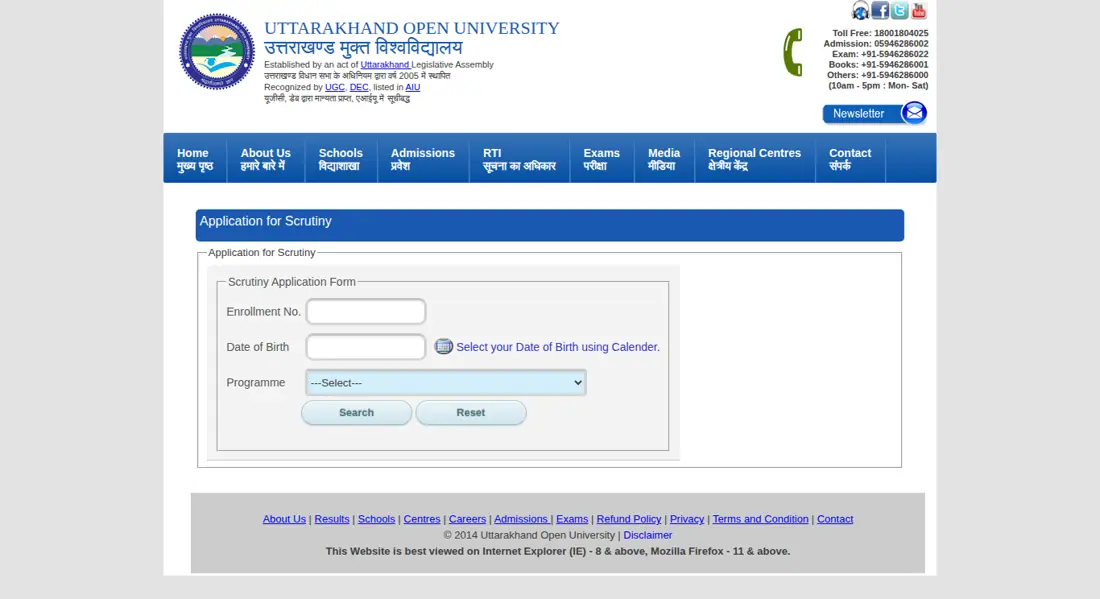
- Open the UOU Scrutiny Application Form on the official website.
- Enter your Enrollment No. in the designated field.
- Select your Date of Birth using the calendar tool.
- Choose your Programme from the dropdown list.
- Click the ‘Get Details’ button to proceed with your application.
Details Required for UOU Scrutiny Application
To successfully submit a UOU scrutiny application, students need to provide specific personal and academic information. These details help the university identify the student and their examination record accurately.
Ensuring the correctness of these details is vital for the proper processing of the scrutiny request.
- Enrollment No.
- Date of Birth
- Programme
UOU Main Examination Results: Latest Sessions
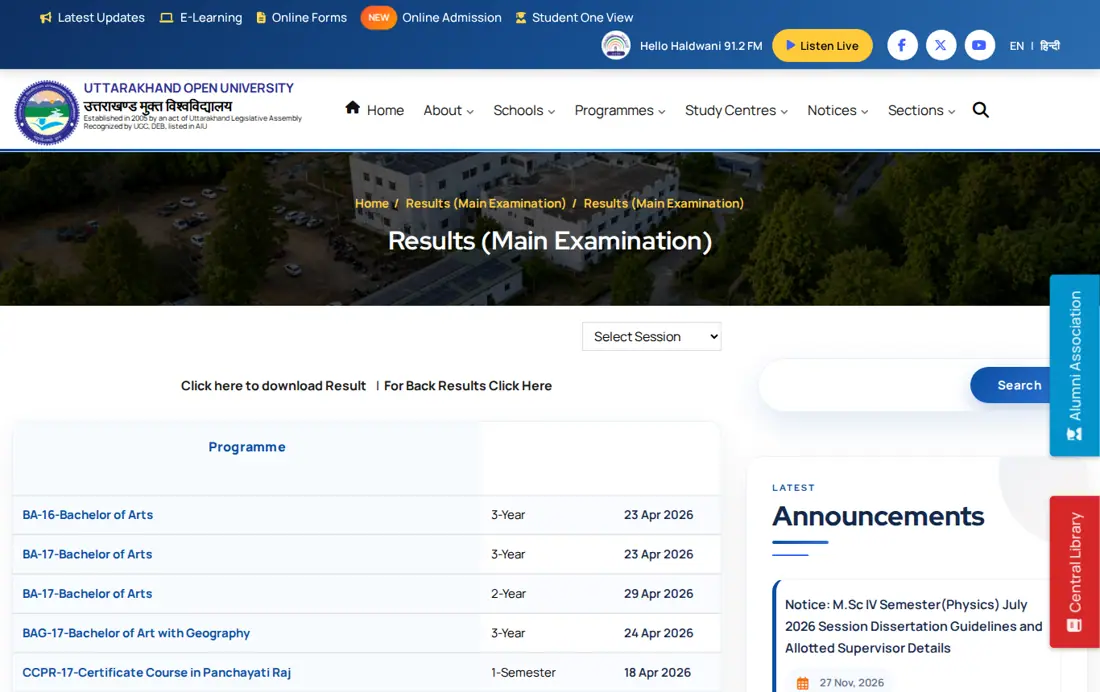
Uttarakhand Open University publishes main examination results for various programmes on its dedicated results portal. Students can check their performance for different academic years and semesters.
As of 27 November 2026, the results portal lists ‘JULY-2025’ and ‘JANUARY-2026’ as the latest available sessions for checking main examination results.
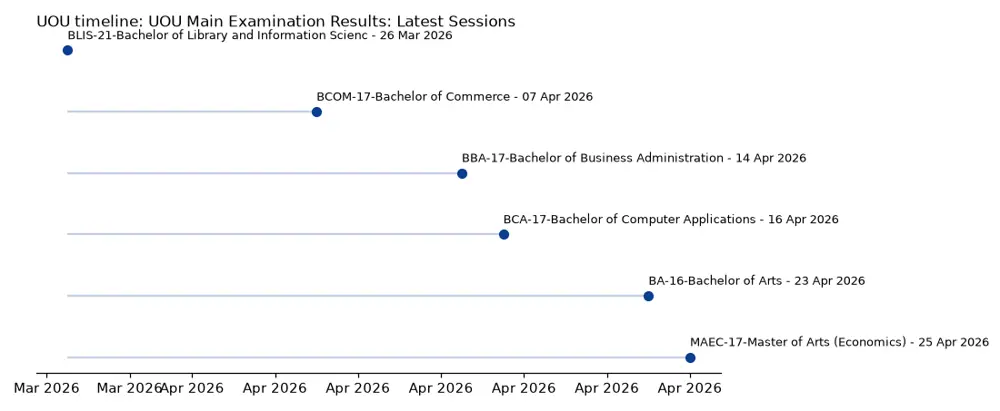
Recently Published UOU Main Examination Results (April 2026)
| Programme | Year/Semester | Publish Date |
|---|---|---|
| BA-16-Bachelor of Arts | 3-Year | 23 Apr 2026 |
| MAEC-17-Master of Arts (Economics) | 2-Year | 25 Apr 2026 |
| BBA-17-Bachelor of Business Administration | 6-Semester | 14 Apr 2026 |
| BCOM-17-Bachelor of Commerce | 3-Year | 07 Apr 2026 |
| BCA-17-Bachelor of Computer Applications | 6-Semester | 16 Apr 2026 |
| BLIS-21-Bachelor of Library and Information Science | 1-Semester | 26 Mar 2026 |
How to Check UOU Main Examination Results?
Students can check their UOU main examination results by accessing the online Student Information System. This portal allows candidates to retrieve their results using their enrollment number and date of birth.
It is important to select the correct examination type, session, programme, and year/semester to view the accurate result.
- Visit the UOU Student Information System: Student Report portal.
- Select ‘Regular’ from the ‘Examination’ dropdown.
- Choose the relevant ‘Session’ (e.g., JULY-2025, JANUARY-2026).
- Select your ‘Programme’ from the list.
- Choose your ‘Year/Semester’.
- Enter your ‘Enrollment’ number.
- Enter your ‘Date of Birth’.
- Click the ‘Get Result’ button to view your examination outcome.
UOU Back Paper Examination Results: Latest Sessions
UOU also provides results for back paper examinations, allowing students to check their performance in subjects they re-attempted. These results are available on the same online results portal as main examinations.
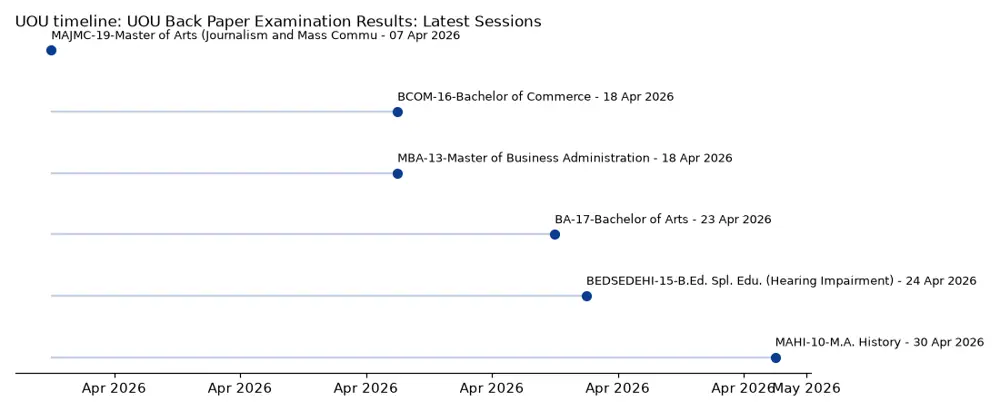
The portal currently lists ‘JULY-2025’ and ‘JANUARY-2026’ as the latest sessions for back paper results. Various programmes have had back paper results published in April 2026.
Recently Published UOU Back Paper Results (April 2026)
| Programme | Year/Semester | Publish Date |
|---|---|---|
| MAHI-10-M.A. History | 1-Year | 30 Apr 2026 |
| MBA-13-Master of Business Administration | 4-Semester | 18 Apr 2026 |
| BEDSEDEHI-15-B.Ed. Spl. Edu. (Hearing Impairment) | 1-Semester | 24 Apr 2026 |
| BCOM-16-Bachelor of Commerce | 3-Year | 18 Apr 2026 |
| BA-17-Bachelor of Arts | 3-Year | 23 Apr 2026 |
| MAJMC-19-Master of Arts (Journalism and Mass Communication) | 4-Semester | 07 Apr 2026 |
How to Check UOU Back Paper Examination Results?
To check UOU back paper examination results, students should navigate to the Student Information System portal. The process is similar to checking main examination results, with a specific selection for the exam type.
Accurate entry of enrollment details and selection of the correct session and programme are essential for retrieving the desired result.
- Visit the UOU Student Information System: Student Report portal.
- Select ‘Back Paper’ from the ‘Examination’ dropdown.
- Choose the relevant ‘Session’ (e.g., JULY-2025, JANUARY-2026).
- Select your ‘Programme’ from the list.
- Choose your ‘Year/Semester’.
- Enter your ‘Enrollment’ number.
- Enter your ‘Date of Birth’.
- Click the ‘Get Result’ button to view your back paper result.
UOU Transcript/Marksheet Download: June 2026 Session
Uttarakhand Open University provides an online facility for students to download their transcripts or marksheets. This service is crucial for academic and professional purposes, offering a consolidated record of performance.
Students can select the specific session and their programme to generate and download their official academic documents, with sessions available up to June 2026.
How to Download UOU Transcript/Marksheet?
Downloading your UOU transcript or marksheet involves a few steps on the dedicated online portal. This ensures that students can access their academic records conveniently.
It is important to select the correct session and programme to ensure the accurate document is generated for download.
- Go to the UOU Transcript/Marksheet Download page.
- Select the desired ‘Session’ from the dropdown list (e.g., JUNE-2026, DEC-2025).
- Choose your ‘Programme’ from the extensive list provided.
- Enter your ‘Enrollment No.’ in the specified field.
- Enter your ‘Date of Birth’.
- Click the ‘Get Transcript’ button to view and download your document.
UOU B.Ed Entrance Exam Results 2026
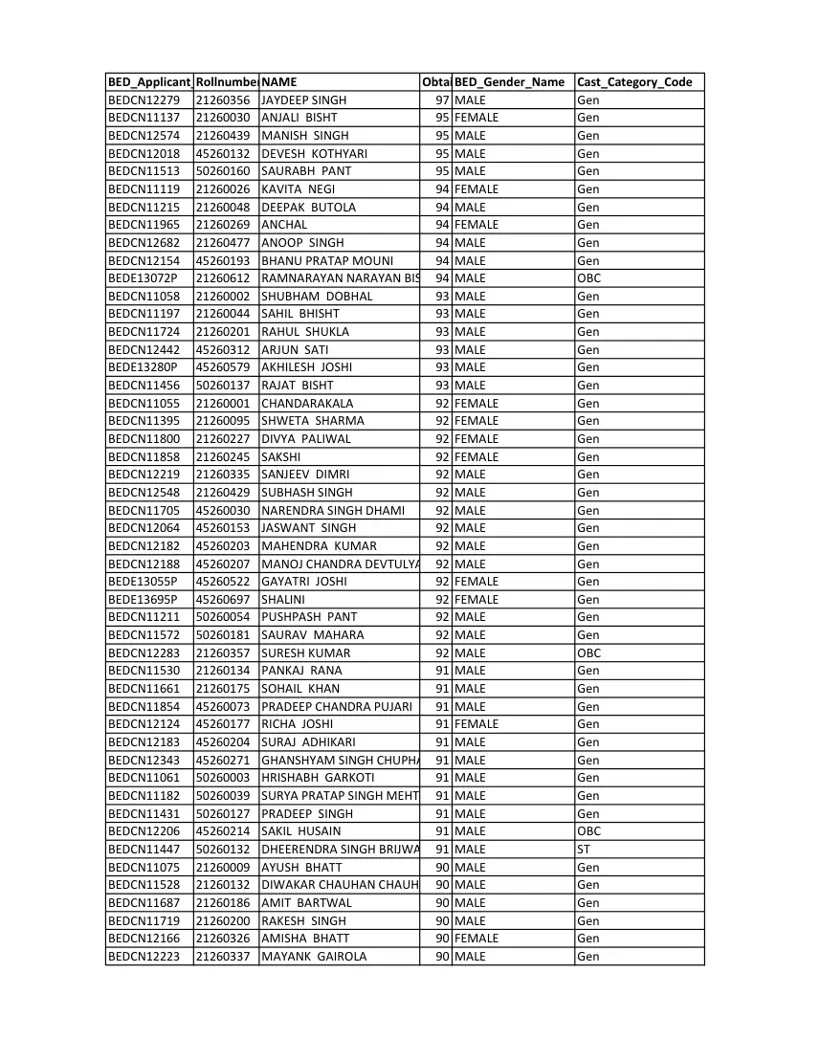
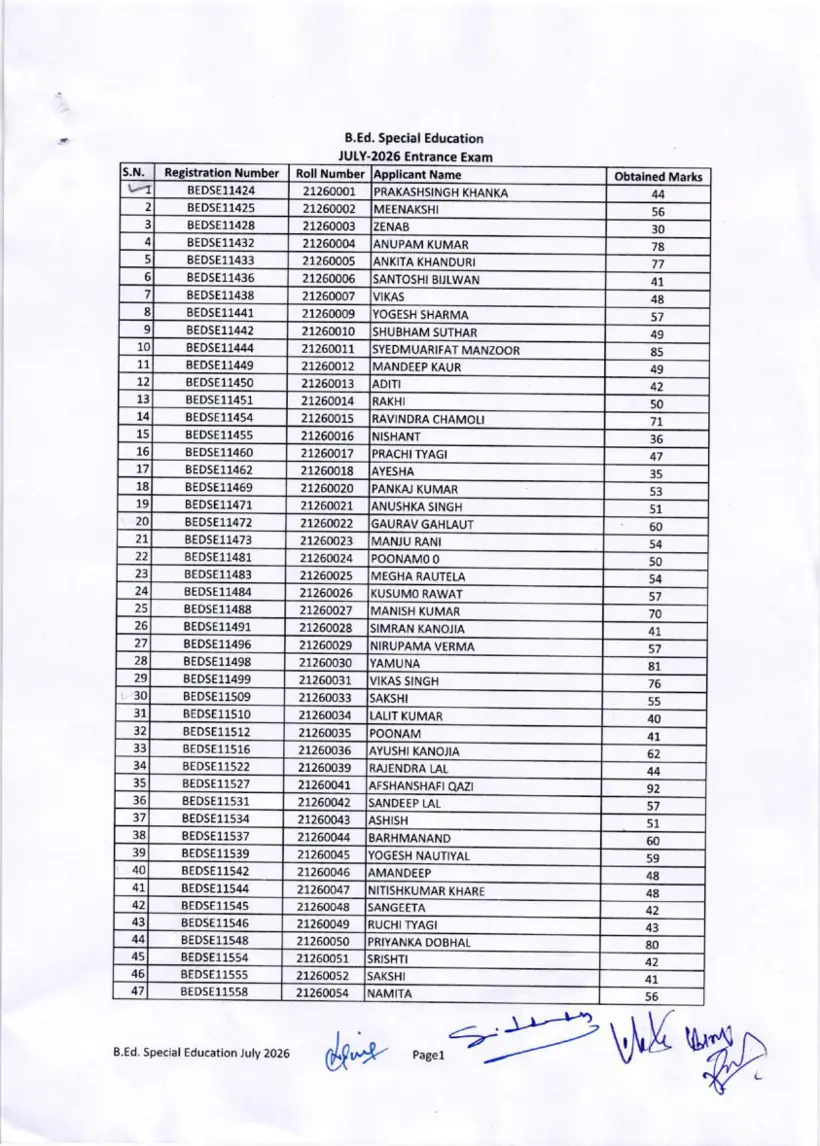
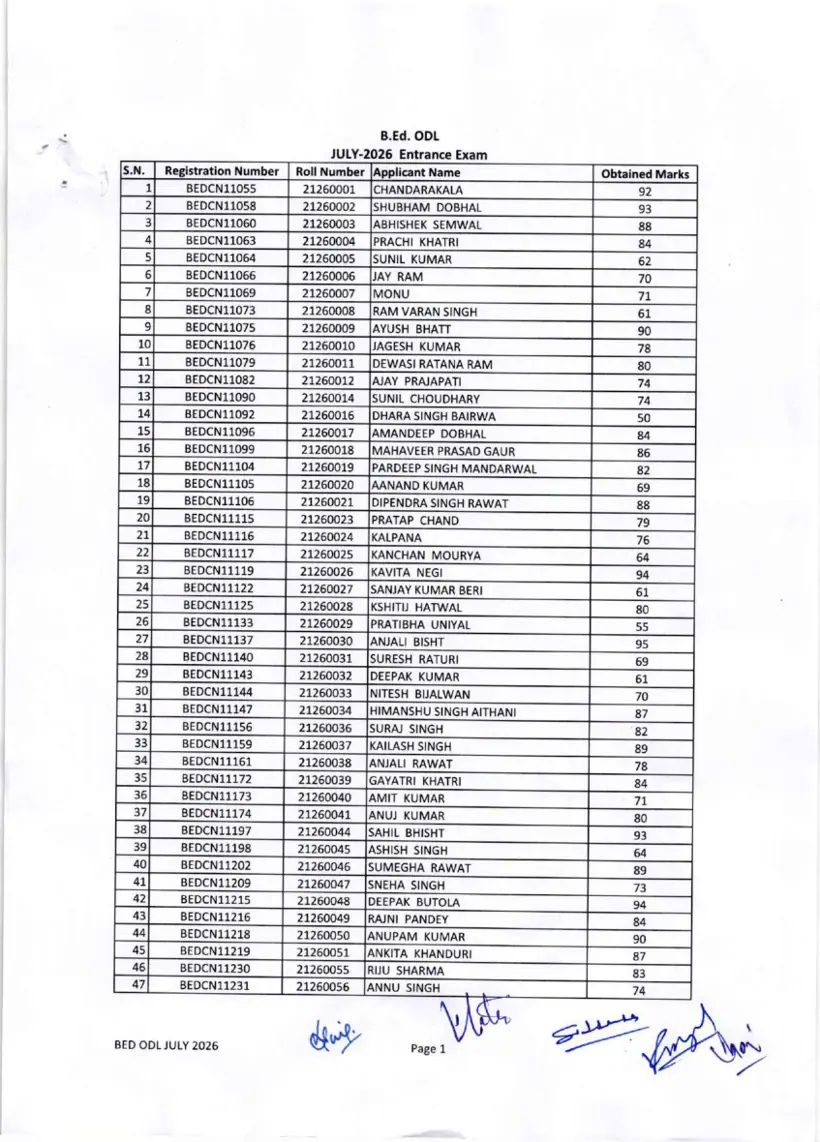
Uttarakhand Open University announced the results for the B.Ed (ODL) Entrance Exam 2026 and B.Ed (Special) Entrance Exam 2026 in September 2026. These results include merit lists for various categories.
Candidates can access the PDF documents to check their registration numbers, roll numbers, names, obtained marks, gender, and caste category codes.
UOU B.Ed Entrance Exam Results 2026 Overview
| Exam Type | Publication Date | Relevant Documents |
|---|---|---|
| B.Ed (ODL) Entrance 2026 | September 2026 | Result B.Ed (ODL) Entrance 2026, UOU B.Ed ODL Entrance Exam Merit List 2026 |
| B.Ed (Special) Entrance 2026 | September 2026 | Result B.Ed (Special) Entrance 2026 |
| B.Ed Entrance General Category 2026 | September 2026 | UOU B.Ed Entrance Exam General Category Merit List 2026 |
| B.Ed Entrance Uttarakhand Female Category 2026 | September 2026 | UOU B.Ed Entrance Exam Uttarakhand Female Category Merit List 2026 |
What to do if UOU Result or Scrutiny Application Problem?
If students encounter issues while checking UOU results or applying for scrutiny, they should ensure all entered details are correct. Common problems arise from incorrect enrollment numbers or dates of birth.
UOU provides contact numbers for examination-related queries, which can be used for assistance. The university’s contact details are available for support during working hours.
- Exam: +91-5946286022
- Toll Free: 18001804025
UOU Revaluation & Results: Next Steps
Students who wish to apply for scrutiny for the June 2026 examination should do so promptly using the online portal. Ensure all details are accurate before submission.
For those checking results, verify the correct session and examination type on the results portal. Transcripts for sessions up to June 2026 are also available for download.
Questions about UOU Revaluation & Results
How can I check if I have passed a subject exam at Uttarakhand Open University (UOU)?
Students can check their subject exam results by visiting the UOU Student Information System: Student Report portal. Select ‘Regular’ or ‘Back Paper’ as the examination type, choose the relevant session, programme, year/semester, and then enter your Enrollment Number and Date of Birth to view your result.
What is the process for applying for scrutiny of UOU exam papers?
To apply for scrutiny, students need to visit the UOU Scrutiny Application Form online. On this form, enter your Enrollment No., Date of Birth, and select your Programme, then click ‘Get Details’ to proceed with the application for the June 2026 examination.
Which sessions are available for checking main examination results on the UOU portal?
As of 27 November 2026, the UOU results portal lists ‘JULY-2025’ and ‘JANUARY-2026’ as the latest available sessions for checking main examination results. Students should select the appropriate session when searching for their scores.
Can I download my UOU marksheet or transcript online?
Yes, UOU provides an online facility to download your transcript or marksheet. Visit the UOU Transcript/Marksheet Download page, select the session (e.g., JUNE-2026), your programme, and enter your Enrollment No. and Date of Birth.
When were the UOU B.Ed Entrance Exam 2026 results published?
The results for the UOU B.Ed (ODL) Entrance Exam 2026 and B.Ed (Special) Entrance Exam 2026, along with various merit lists, were published in September 2026. These results are available as PDF documents on the UOU website.
What information is needed to check UOU examination results online?
To check UOU examination results online, students need their Enrollment Number and Date of Birth. Additionally, they must select the correct Examination Type (Regular, Back Paper, Improvement Paper), Session, Programme, and Year/Semester on the results portal.
How can students contact UOU if they face problems with examination results or scrutiny applications?
Students facing result or scrutiny issues can contact the UOU exam department at +91-5946286022 or call the toll-free number 18001804025. Support is available from 10 am to 5 pm from Monday to Saturday. Candidates should verify their enrollment number and date of birth before seeking assistance.
When were the UOU BA 3rd Year main examination results for 2026 published?
Main examination results for the UOU BA 3-Year programme (BA-16 and BA-17) were published on 23 April 2026. Students can access their marks on the main results portal by selecting the appropriate examination type and session. Verification requires entering the candidate enrollment number and date of birth.
What was the top score achieved in the UOU B.Ed ODL Entrance Exam 2026?
In the UOU B.Ed ODL Entrance Exam 2026 Merit List, candidate Jaydeep Singh secured the top position with 97 marks under the General category. Candidates Anjali Bisht, Manish Singh, Devesh Kothyari, and Saurabh Pant achieved the next highest score of 95 marks. Candidates can check their score details on published merit lists.
UOU Revaluation & Results: official portals and documents
- Apply for Scrutinyonline.uou.ac.in ↗
- Check Main/Back Resultsuou.ac.in ↗
- Download Transcript/Marksheetuou.ac.in ↗
- Main Exam Resultsuou.ac.in ↗
- Back Exam Resultsuou.ac.in ↗
- UOU B.Ed ODL Entrance Exam Result July 2026 PDF — Result B.Ed (ODL) Entrance 2026
- UOU B.Ed Special Education Entrance Exam Result July 2026 PDF — Result B.Ed (Special) Entrance 2026
- UOU B.Ed ODL Entrance Exam Merit List 2026 PDF — UOU B.Ed ODL Entrance Exam Merit List 2026
- UOU B.Ed Entrance Exam General Category Merit List 2026 PDF — UOU B.Ed Entrance Exam General Category Merit List 2026
- UOU B.Ed Entrance Exam Uttarakhand Female Category Merit List 2026 PDF — UOU B.Ed Entrance Exam Uttarakhand Female Category Merit List 2026
More on Results